

This article will introduce the steps on transferring stocks from your CDP account.
1. Please submit your application according to the Share Transfer guideline, select "Central Depository (CDP)" in "Delivery Broker", and enter your CDP account number starting with 1681XXXXXXXX into "Account Number".
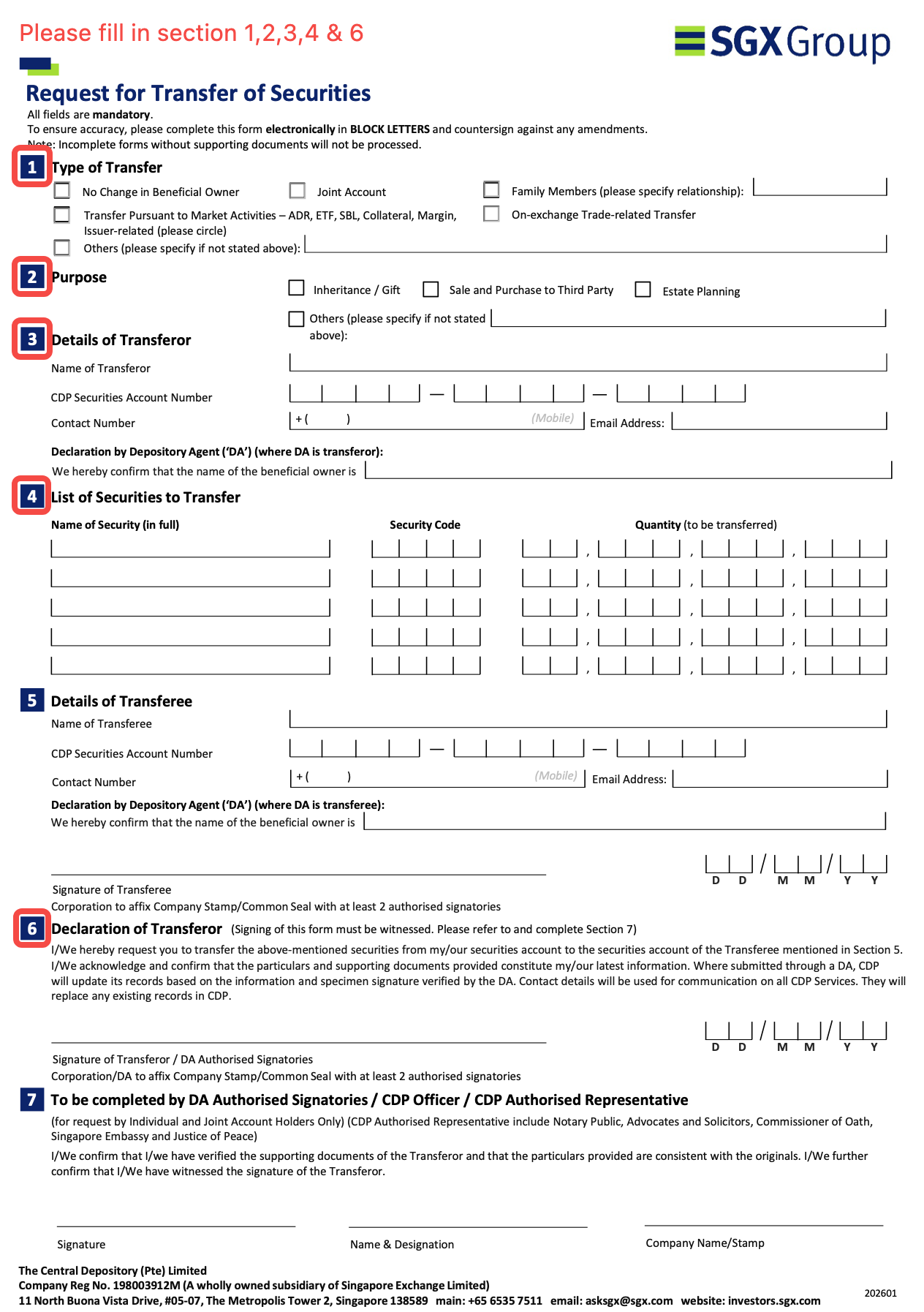
2. An auto-generated email with the CDP form attached will be sent to your registered email. (Please note that the form in the email is the old version. For your reference, the latest version of the form can be downloaded here: Request for Transfer of Securities.)
3. Please reply the email with following files:
- A copy of NRIC (Front & Back)
- CDP Form “Request for Transfer of Securities” — ensure Sections 1, 2, 3, and 4 are completed, and Section 6 is signed.
We will process your application after receiving your email, and the stocks will be allocated into your Longbridge account in 3 to 15 business days.
- Contact Us
- WhatsApp Chat (for general enquiries):+65 6330 3035
- Trading days: 9:00am – 6:00pm (GMT+8)
- Dealing Hotline:+65 6330 3030
- Trading days: 9:00am – 6:00pm (GMT+8)
- For Institutions
- Corporate Services
- OpenAPI
- contact@longbridge.sg
- About
- About us

Registered with the Monetary Authority of Singapore (MAS), Long Bridge Securities Pte. Ltd. is a Capital Markets Services Licence holder and Exempt Financial Adviser (Licence No. CMS101211).

A licensed corporation recognized by the SFC (CE No. BPX066). Holder of License Types 1 (Dealing in Securities), 2 (Dealing in Futures Contracts), 4 (Advising on Securities) and 9 (Asset Management). Also a registered HKEX participant and HKSCC participant.
 Long Bridge Securities LLC
A broker dealer registered with the Securities and Exchange Commission (SEC)(CRD: 314519/SEC: 8-70711), a member of the Financial Industry Regulatory Authority (FINRA) and Securities Investor Protection Corporation (SIPC).

A New Zealand registered Financial Service Provider (FSP number: FSP600050), and is a member of the Financial Dispute Resolution Scheme, a New Zealand independent dispute resolution service provider.
Long Bridge Securities Pte. Ltd. (“Long Bridge Securities”) (UEN No.: 202111825D) is regulated by the Monetary Authority of Singapore and holds a Capital Markets Services Licence for dealing in capital markets products that are securities, collective investment schemes, and exchange-traded derivatives contracts, and is an Exempt Financial Adviser.
The information contained on this website is provided for general information and educational purposes only. It does not take into account your specific investment objectives, financial situation, or particular needs. The content on this website does not constitute financial advice, an investment recommendation, an offer, or a solicitation to buy or sell any financial product.
You should carefully consider the suitability of any investment in light of your own circumstances, including your investment objectives, financial situation, and risk tolerance. Where necessary, you should seek advice from an independent financial adviser under a separate engagement before making any investment decision.
All investments carry risks. The value of financial instruments and products may rise or fall, and you may lose all or more than your initial investment. Past performance is not necessarily indicative of future results. Certain products, such as margin trading, options, warrants, exchange-traded derivatives, and structured products, involve a high degree of risk and may not be suitable for you.
Before trading, you must read the relevant risk disclosure statements available on the Longbridge Risk Disclosure Statement page.
While Long Bridge Securities takes reasonable care to ensure that the information provided on this website is accurate as at the time of publication, no representation or warranty is made as to its accuracy, adequacy, completeness, or reliability. Information may be subject to change without notice. Long Bridge Securities shall not be liable for any loss or damage arising from any reliance on or use of the information contained on this website.
This advertisement has not been reviewed by the Monetary Authority of Singapore.
In the event of any discrepancy or inconsistency between the English version and the Chinese translation, the English version shall prevail.